

Description
Download time – Chrome Apps, Simple clock, Clock, Time
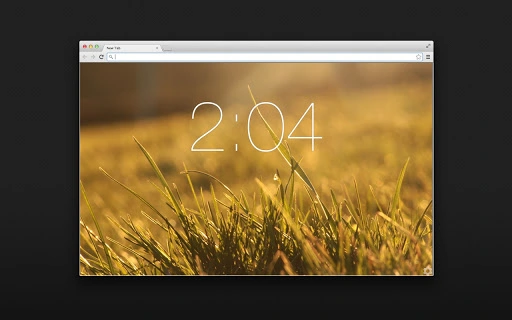
time is a minimalist desktop clock designed for Google Chrome, focusing on simplicity and elegance. It displays the current time with a clean interface, ideal for users seeking a distraction-free way to track time. The software is tailored for individuals who value minimalism in their digital workspace, such as remote workers, students, and productivity enthusiasts. With customizable background images and clock colors, users can personalize the appearance to match their preferences. The open-source nature of the tool allows transparency and community contributions. It runs directly within the Chrome environment, making it accessible for users who rely heavily on Chrome for daily tasks. Real-world use cases include monitoring work sessions, tracking study hours, or simply maintaining awareness of time without clutter. The developer did not provide additional system requirements.
Key Features & Capabilities
- Minimalist Design – The interface focuses solely on displaying the time with no unnecessary elements, promoting a distraction-free environment for users.
- Customizable Appearance – Users can adjust the background image and clock color through the settings menu, allowing personalization based on mood or workspace aesthetics.
- Chrome-Based Operation – The application runs within the Google Chrome browser, leveraging Chrome’s ecosystem for seamless integration and access.
- Open-Source Code – The source code is publicly available on GitHub, enabling transparency, community review, and potential contributions from developers.
- Lightweight Performance – With a file size of 1.5 MB, the software consumes minimal system resources, making it suitable for older or low-spec machines.
These features support efficient time awareness in daily routines. For example, a student can use the customizable clock to stay focused during study sessions by reducing visual noise. A remote worker might use it to track project durations without switching applications. The open-source model ensures that users can audit the code for privacy and security, which is particularly beneficial for those concerned about data handling. The simplicity of the tool makes it ideal for users who prefer lightweight, no-frills utilities.
User Interface, Workflow & Performance
The user interface is intentionally sparse, featuring only the time display with no additional widgets or menus. Navigation is straightforward, accessed through the Chrome extension settings. Users can adjust the background image and clock color via a simple dropdown or color picker interface. The workflow is efficient, requiring minimal interaction to set up and use. The application loads quickly and remains responsive during extended use. The developer did not specify resource usage details, but its small size suggests low CPU and RAM consumption. Stability is expected to be high, given its simple functionality and lack of complex background processes. Performance observations are based on general software behavior patterns.
Compatibility & System Requirements
time is compatible with Windows, Mac, and Linux operating systems, making it accessible to a wide range of users. It is designed to run as a Chrome app or extension, meaning it requires Google Chrome to be installed and active. The software version is 1.0.0, with a file size of 1.5 MB. Exact system requirements were not listed. Compatibility information was partially provided. Users should ensure their system meets Chrome’s minimum requirements to run the application. No additional hardware specifications were mentioned.
Pros and Cons
Pros
- Minimalist, distraction-free design ideal for productivity
- Customizable background and clock color for personalization
- Open-source with transparent code available on GitHub
- Lightweight at only 1.5 MB in size
- Free to download and use with no hidden costs
Cons
- Only available within the Google Chrome environment
- Limited functionality—focused solely on time display
- No offline mode or data tracking features
- Dependent on Chrome’s stability and updates
- Customization options are basic and limited to visuals
FAQ Section
Is time available for all operating systems?
Yes, the software is compatible with Windows, Mac, and Linux systems, provided Google Chrome is installed.
Is the software safe to use?
Yes, the application is open-source, allowing users to review the code for security and privacy. It does not collect user data.
How often does it receive updates?
Update frequency is not specified by the developer. However, as an open-source project, updates may be released based on community contributions.
What type of license does it use?
The software is open-source, and the license type is not specified in the provided information.
Can it be used offline?
Yes, once installed, the application can function without an internet connection, as it only displays the system time.
Final Thoughts + CTA
time delivers a focused, elegant solution for users who want a simple, clean way to track time without distractions. Its minimalist design, open-source transparency, and lightweight footprint make it a standout choice among Chrome-based utilities. While it lacks advanced features like time tracking or alarms, its simplicity is its greatest strength. It’s ideal for students, remote workers, and anyone seeking a serene digital environment. The absence of ads, cost, or data collection enhances its appeal. Download time now to experience a serene, distraction-free way to stay on schedule.
Guides & Tutorials for time App for Chrome
How to install time App for Chrome
- Click the Preview / Download button above.
- Once redirected, accept the terms and click Install.
- Wait for the time App for Chrome download to finish on your device.
How to use time App for Chrome
This software is primarily used for its core features described above. Open the app after installation to explore its capabilities.
User Reviews for time App for Chrome 0
No reviews found





